How to edit a PDF in Word
By Convertifyy team · · 4 min read
Short answer
To edit a PDF in Word, convert it to DOCX first. Open Convertifyy PDF to Word, add the PDF and press Convert; open the DOCX in Word or Google Docs and make your changes. When you’re done, save it as PDF again. The file is converted on our server and deleted straight after.
PDF to Word, free and private
Editable DOCX. Files deleted right after converting.
Step by step
Step 1Open PDF to Word and add your PDF (up to 25 MB).
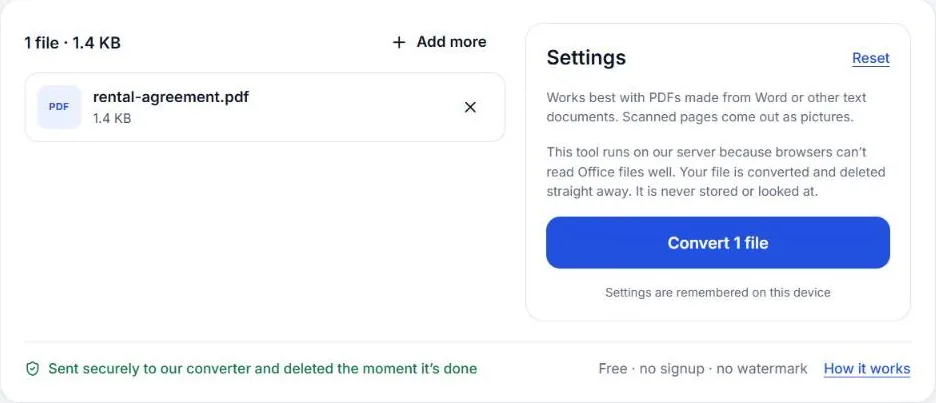
Step 2Press Convert. The text keeps its position on the page, so the layout stays close to the PDF.
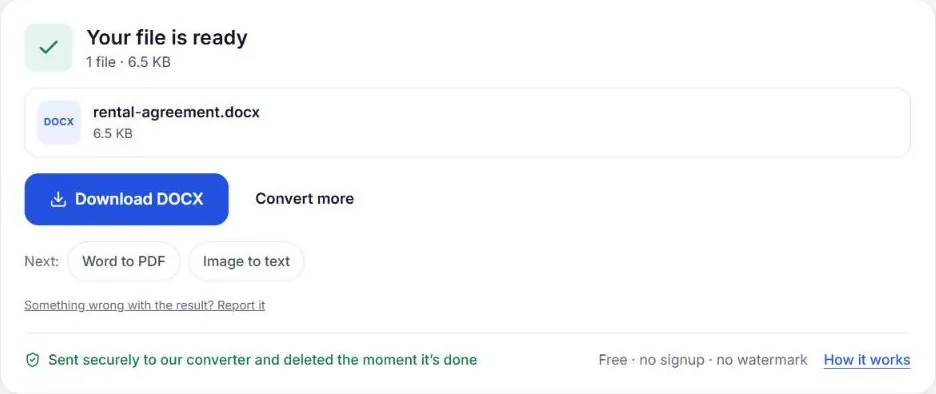
Step 3Download the DOCX, open it in Word or Google Docs, and edit. Save as PDF when you’re done.
Why you can’t just type into a PDF
A PDF is a finished page, like a printout. It records where each letter sits, not paragraphs and styles. That’s why it looks the same everywhere, and why editing it needs special software. Converting to a Word document (DOCX) turns it back into text you can change.
Three ways to do it
| Way | Good for | Watch out for |
|---|---|---|
| Open the PDF in Word (File › Open) | You have Microsoft Word installed | Complex pages can shift |
| Convert with PDF to Word | No Word, a phone, or Word’s result looks wrong | Needs an internet connection; 25 MB limit |
| Open in Google Docs (right-click in Drive › Open with Google Docs) | Plain text documents | Loses most formatting and images |
All three work best on PDFs that were made from a text document (Word, Google Docs, a website). Scans behave differently; see below.
Getting a clean result
- Text boxes: to keep lines where they were on the page, the converted file can place text in boxes. For small edits that’s fine. For a big rewrite, select the text, copy it into a fresh document and reformat.
- Fonts: if the PDF used a font your computer doesn’t have, Word shows a similar one. Pick a common font for the whole document if spacing looks off.
- Tables: check that columns lined up correctly; occasionally a row needs to be merged back.
Scanned PDFs
If you can’t select text in the PDF, it’s a scan: each page is a picture. Converting a scan to Word gives you pictures in a document, not editable text. Instead:
- Save the pages as images with PDF to JPG.
- Copy the words out with Image to text (see how to copy text from a photo).
- Paste into Word and format it.
Check these after converting
Open the DOCX and look through it before you start editing:
- Page count. It should match the PDF. An extra blank page usually comes from a long table or a large image near the bottom of a page.
- Headers and footers. Page numbers and letterheads sometimes come through as ordinary text at the top of each page. If you’re making big changes, delete them and use Word’s Insert › Page Number instead.
- Images. Logos and photos should be in place. If one is missing, save that page as an image with PDF to JPG and insert it.
- Symbols. Rupee signs, bullets and accented names can change if the PDF didn’t include its fonts. Search for them and retype where needed.
Small edits or a big rewrite?
For changing a date, a name or a figure, edit in place and keep the layout as it is. For rewriting more than a paragraph or two, copy the text into a new blank document and use Word’s built-in styles. It’s quicker than fighting text boxes, and the new PDF will look cleaner.
Turning it back into a PDF
When you’ve finished editing, save it as a PDF again: in Word, File › Save As › PDF. No Word? Use Word to PDF. For tips on keeping the layout, read Word to PDF without losing formatting.
What happens to your file
PDF to Word runs on our converter because browsers can’t do this conversion well. The PDF is sent over an encrypted connection, converted in one go and deleted the moment the DOCX is sent back. We never store or read it.
A note on signed and official documents
Editing a PDF you received doesn’t change the original. For signed agreements, certificates or government documents, don’t alter the content and present it as the original; ask the issuer for a corrected copy instead.
Questions
Can Word open a PDF directly?
Yes, recent versions of Word can open a PDF and convert it (File › Open). Results vary with complex layouts; a converter is an alternative when you don’t have Word or the result looks wrong.
Why is my text in boxes after converting?
To keep the layout close to the PDF, some lines are placed in text boxes. Click inside a box to edit, or copy the text out into normal paragraphs if you’re rewriting a lot.
Can I edit a scanned PDF?
Scanned pages are pictures, so they come out as pictures. Use PDF to JPG and Image to text to get the words, then paste them into Word.
Is it free?
Yes: 20 conversions a day, files up to 25 MB, no watermark and no signup.
PDF to Word, free and private
Editable DOCX. Files deleted right after converting.