How to copy text from a photo or screenshot
By Convertifyy team · · 4 min read
Short answer
To copy text from an image, open Convertifyy Image to text, add the photo or paste a screenshot with Ctrl V, and press Get text. The text appears in a box you can copy or download as a TXT file. It reads English text, runs in your browser and never uploads the image.
Image to text, free and private
Copy text from screenshots. Runs in your browser; nothing is uploaded.
Step by step
Step 1Open Image to text. Add a photo, drop a file, or press Ctrl V to paste a screenshot straight from your clipboard.
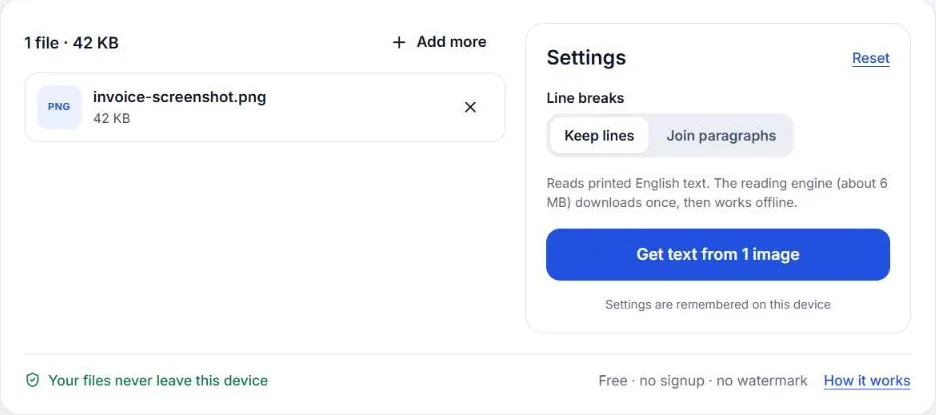
Step 2Press Get text. The first time, the reader takes a few seconds to load; after that it’s quick.
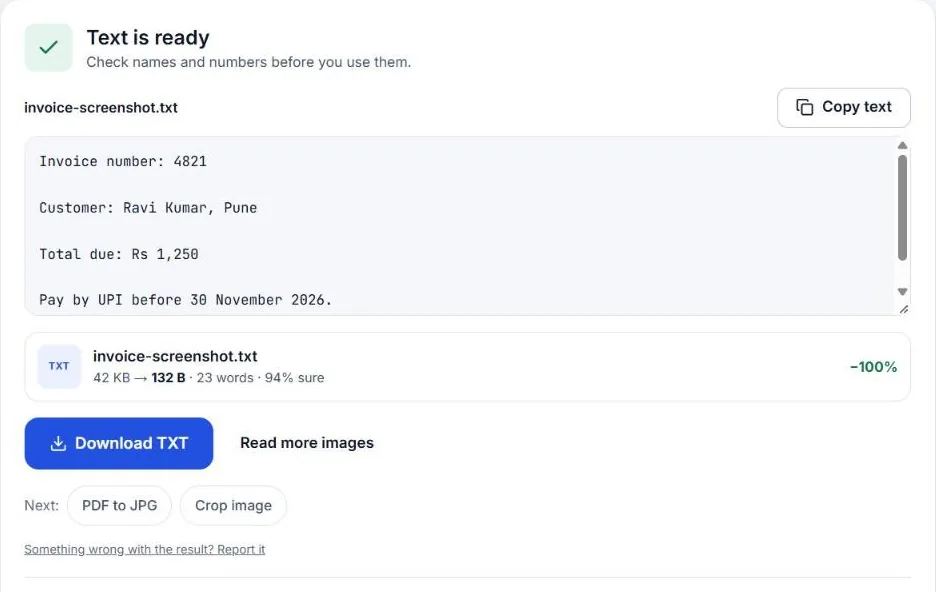
Step 3Copy the text or download it as TXT. Turn on Join paragraphs if you want to paste it into an email without line breaks.
What “copy text from an image” means
When text is inside a picture, such as a screenshot, a photo of a notice or a scanned page, your phone sees pixels, not letters. OCR (optical character recognition) reads those pixels and turns them back into text you can copy, edit and search.
The built-in ways
Your phone or computer may already do this:
- iPhone (iOS 15 and later): open the photo, press and hold on the text, and Live Text lets you select and copy it.
- Android: open the photo in Google Photos and tap Lens, then Text.
- Windows 11: take a screenshot with the Snipping Tool and use Text actions to copy the text.
These are great for a line or two. For a whole page, a long screenshot, or when you want the text as a file, a dedicated tool is easier.
Getting clean results
OCR is only as good as the picture. These make the biggest difference:
- Screenshots beat photos. A screenshot of a web page or PDF gives near-perfect text.
- Photograph pages flat and straight, in daylight, with no shadow from your hand or phone.
- Crop to the text. Logos, stamps and table lines can turn into stray characters. Use Crop image first.
- Bigger is better. Small text in a big photo reads badly. Zoom in or crop so the text is large.
Text from PDFs
If a PDF lets you select text, just copy it directly. If it’s a scan (you can’t select anything), save the page as a picture with PDF to JPG at 300 DPI, then run Image to text on that picture.
Privacy
Screenshots often contain chats, bank details or addresses. Image to text reads the picture on your own device: the image isn’t uploaded anywhere.
What it can’t do yet
- Hindi and other Indian languages are planned but not available yet.
- Handwriting is unreliable with any free OCR.
- Tables come out as text lines; you may need to rebuild columns in a spreadsheet.
What people use it for
- Copying an account number or address from a screenshot instead of typing it.
- Turning a printed notice into text you can forward on WhatsApp or email.
- Pulling quotes from book pages or slides for notes.
- Getting text out of a scanned letter so you can edit and reply.
Check the text before you use it
OCR can confuse similar characters: 0 and O, 1 and l, 5 and S, and the rupee sign. Before you paste numbers into a payment, a form or a bank transfer, compare them with the picture. For anything important, the picture is the source of truth.
Taking a clean screenshot first
A sharp screenshot gives far better text than a photo of a screen. The quickest ways:
- Windows: press Windows + Shift + S, drag over the text, then press Ctrl V on the Image to text page. The screenshot goes straight from the clipboard into the tool.
- Mac: press Cmd + Ctrl + Shift + 4, select the area, then press Cmd V on the page.
- Android: press Power + Volume down, then choose the screenshot from your gallery.
- iPhone: press Side button + Volume up, then choose the screenshot from Photos.
Zoom in on small text before taking the screenshot: bigger letters mean fewer mistakes.
Questions
Can I copy text from an image for free?
Yes. Image to text is free with no signup and no daily limit, and it runs in your browser.
Does it read Hindi or handwriting?
It reads printed English today. Hindi is planned. Handwriting is hit and miss with any free OCR, so check the result carefully.
Why does the text come out wrong?
Blurry, tilted or dark photos confuse OCR. Retake the photo flat and in daylight, or crop to just the text before you press Get text.
Can I copy text from a photo on my phone?
Yes. Open Image to text in Chrome or Safari, tap Choose files and pick the photo from your gallery, then tap Get text and Copy. It works the same on Android and iPhone.
Can I copy text from a PDF that is a scan?
Convert the page to an image with PDF to JPG, then add that image to Image to text.
Image to text, free and private
Copy text from screenshots. Runs in your browser; nothing is uploaded.