How to reduce PDF size to 100 KB or 200 KB for online forms
By Convertifyy team · · 4 min read
Short answer
To reduce PDF size to 100 KB, open Convertifyy Compress PDF, add your file, choose Target size and type 100. It shrinks the photos inside the PDF step by step until the file fits, while text stays sharp. It’s free, works on phone and computer, and the PDF is never uploaded.
Compress PDF, free and private
Smaller PDFs, under 100 KB mode. Runs in your browser; nothing is uploaded.
Step by step
Step 1Open Compress PDF and add your PDF: drop it on the page or tap Choose files.
Step 2Choose Target size and type the limit from your form, such as 100 or 200 (KB).
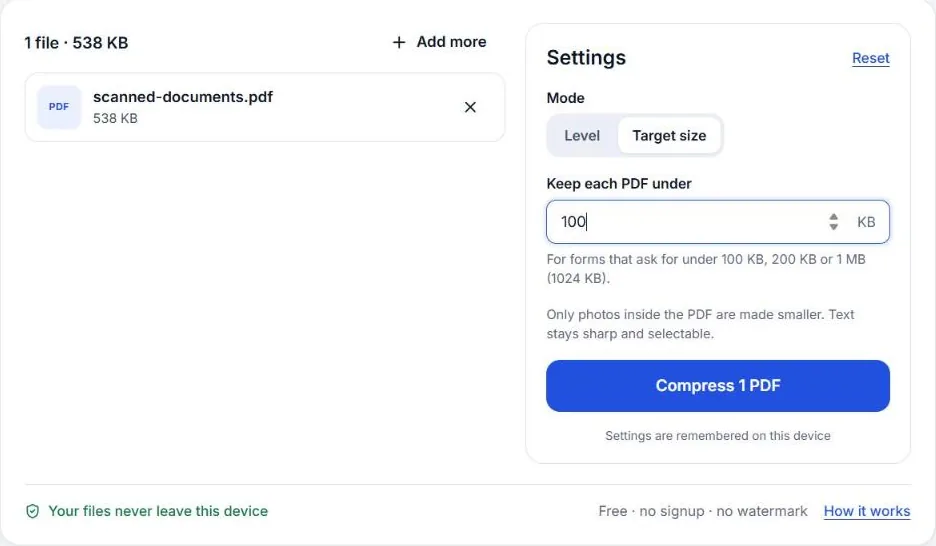
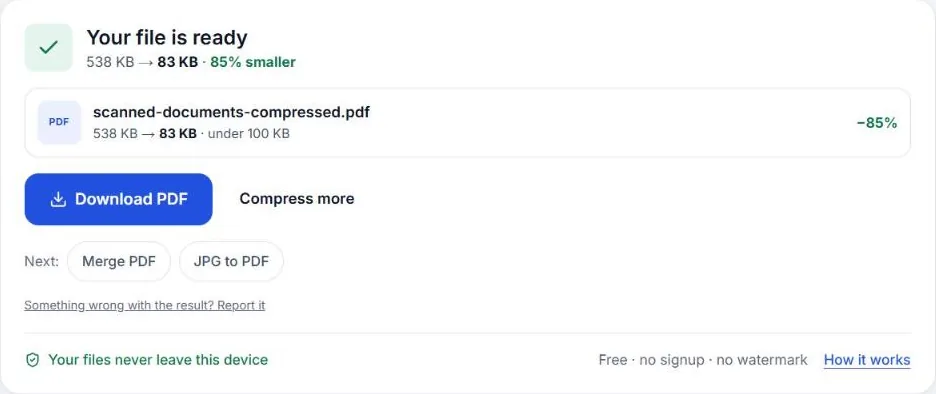
Step 3Press Compress. Check the new size shown next to the file, then download it.
Why your PDF is too big
A PDF is big for one reason almost every time: it contains photos. A phone photo of a document is 2–5 MB, and a scanner set to colour at 600 DPI produces even bigger pages. Text itself takes very little space: a ten-page typed letter is often under 100 KB already.
So the trick isn’t to “zip” the PDF. It’s to make the pictures inside it smaller while leaving the text alone. That’s what Compress PDF does.
Pick the right setting
Compress PDF has two modes:
| Mode | Use it when | What happens |
|---|---|---|
| Light / Medium / Strong | You just want a smaller file for email | Photos are resized and recompressed by a fixed amount |
| Target size | A form gives an exact limit (100 KB, 200 KB, 1 MB) | Tries stronger steps until the PDF fits, then stops |
For online forms, always use Target size. It finds the lightest compression that meets your limit, so the result looks as good as it can.
If it still doesn’t fit
Sometimes the tool tells you it couldn’t reach the limit and shows the smallest size it got. Try these, in order:
- Remove pages you don’t need. A blank back side or an instructions page still costs space.
- Rebuild the PDF from photos with a size limit. If you made the PDF from phone photos, open JPG to PDF, add the photos again and turn on Keep under a size. Starting from the photos gives better quality than squeezing an existing PDF.
- Scan in grayscale. If you’re scanning, black-and-white documents don’t need colour; grayscale scans are far smaller.
- Split the upload. Some portals allow separate files for each document. Upload them separately rather than merging everything.
Common limits and what fits
These are typical, not official numbers. Always check your own form:
| Limit | What usually fits and stays readable |
|---|---|
| 100 KB | 2–4 scanned pages, or 10+ typed pages |
| 200 KB | 5–8 scanned pages |
| 500 KB | 10–15 scanned pages |
| 1 MB | 20–30 scanned pages, or a few colour photos |
Combining before you compress
If the form wants one PDF with several documents, join them first with Merge PDF, then compress the merged file to the limit. Compressing after merging gives one predictable result instead of guessing a budget for each part.
Privacy
PDFs sent to forms are often the most private files you have: bank statements, ID cards, salary slips. Compress PDF runs on your own phone or computer, so the file is never uploaded to us or anyone else.
Check the result before you upload
A smaller file is only useful if the form still accepts it and the reader can read it. Before uploading:
- Open the compressed PDF and zoom to 100%. Names, numbers and stamps should be clear.
- Check the size in KB. Your phone may show “0.1 MB”, which could be anywhere from 51 KB to 149 KB. Compress PDF shows the exact size next to the file.
- Count the pages. Compression never removes pages, but it’s worth confirming nothing is missing if you merged files first.
- Keep the original. If the form later allows a bigger file, upload the sharper original instead.
Compressing on a phone
Compress PDF works the same in Chrome on Android and Safari on iPhone. Large scanned PDFs (50 MB and more) take longer on a phone and need free memory, so close other apps first, or use a computer for very big files.
Questions
Will compressing make my PDF blurry?
Text, fonts and lines stay exactly as they are. Only photos and scans inside the PDF are made smaller, so at 100 KB a scanned page may look slightly softer but stays readable.
Why can’t my PDF reach 100 KB?
Usually it has too many scanned pages. Each scanned page needs roughly 25–40 KB to stay readable, so ten pages rarely fit in 100 KB. Remove pages you don’t need, or ask whether the form accepts a larger file.
Does it work on my phone?
Yes. Open Compress PDF in Chrome or Safari, choose the file from Downloads or Files, and download the smaller PDF.
Is my PDF uploaded anywhere?
No. Compression runs inside your browser, so bank statements, IDs and certificates never leave your device.
Compress PDF, free and private
Smaller PDFs, under 100 KB mode. Runs in your browser; nothing is uploaded.