How to combine PDF files on your phone, free and without an app
By Convertifyy team · · 4 min read
Short answer
To combine PDF files on your phone, open Convertifyy Merge PDF in Chrome or Safari, choose two or more PDFs, set their order with the arrows and tap Merge. You get one PDF with every page, no watermark and no app to install, and your files are never uploaded.
Merge PDF, free and private
Join PDFs, set the order. Runs in your browser; nothing is uploaded.
Step by step
Step 1Open Merge PDF on your phone and tap Choose files. Select all the PDFs you want to join (hold to select several).
Step 2Use the up and down arrows to put the files in the order you need, for example application form first, then ID, then certificates.
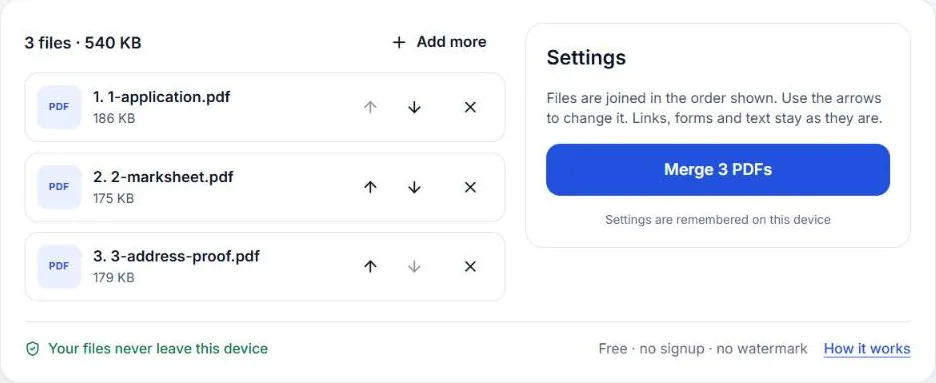
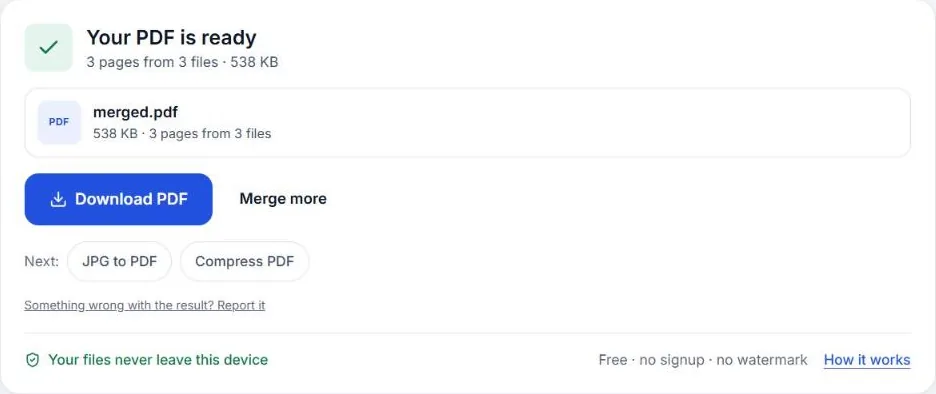
Step 3Tap Merge, then Download. The combined PDF is saved to Downloads (Android) or the Files app (iPhone).
When you need one PDF
Scholarship portals, visa applications, college admissions and HR teams often ask for all documents in a single PDF. Sending five attachments risks one being missed, and many upload forms only have one file box. Joining the files yourself takes a minute.
Doing it on iPhone without any website
On an iPhone you can combine files in the Files app: select the PDFs (tap Select, then each file), tap ⋯ and choose Create PDF. It joins them in the order shown in the folder, so rename the files 1, 2, 3 first if the order matters.
Android has no built-in way to merge PDFs, which is why most people install an app. You don’t need one: a browser tool does the same job.
Why use a browser tool
- Works the same on iPhone, Android and computers. One way to do it everywhere.
- Clear order control. You see the list and move files up or down before merging.
- No upload. Merge PDF joins the files inside your browser. Your documents are never sent to a server, which matters for ID cards and bank papers.
- No watermark or page limit.
Getting the order right
Most rejections for “wrong document” happen because pages are in the wrong order or a page is missing. Before you tap Merge:
- Read the form’s checklist and write the order down.
- Rename files if you have many, so you can tell them apart in the list (for example 1-application.pdf, 2-aadhaar.pdf).
- Check the page count in the merged file. It should equal the total of all the files.
Adding photos of documents
If some documents are photos (a mark sheet you photographed, an ID card), make them into a PDF first with JPG to PDF, then add that PDF to the merge list. Keeping it as a PDF preserves the page size, so everything prints the same.
Keeping it under the upload limit
Merged files add up quickly. If the portal has a limit like 1 MB or 500 KB, open Compress PDF after merging, choose Target size and type the limit. Compressing the final file once gives better quality than compressing each part separately.
Common problems
- A file won’t add. It may be password protected or damaged. Open it in your PDF app; if it asks for a password, save a copy without one first.
- Pages are different sizes. Mixing A4 documents with phone-sized PDFs is fine; each page keeps its own size. If the portal wants all A4, rebuild the photo-based parts with JPG to PDF set to A4.
- The merged PDF opens slowly. It probably contains large scans. Compress it with a target size; it will open faster and upload faster too.
- I merged them in the wrong order. Nothing is lost: add the original files again, fix the order and merge once more. Your originals are never changed.
Merging on a computer instead
The same steps work on a laptop: open Merge PDF, drag all the files onto the page at once, sort them, and merge. On a computer it’s easier to check every page afterwards in a big window, which is worth doing for long applications. Windows and Mac don’t include a simple way to merge PDFs (Mac Preview can, by dragging page thumbnails between files, but it’s fiddly), so a browser tool is usually the quickest option on both.
Questions
Can I combine PDF files on my phone for free?
Yes. Merge PDF is free with no watermark and no signup, and joins up to 100 files at a time. It runs in your phone’s browser, so there’s nothing to install.
Can I combine photos and PDFs together?
First turn the photos into a PDF with JPG to PDF, then merge that PDF with the others.
The merged file is too big. What now?
Open Compress PDF, add the merged file, choose Target size and type your limit in KB.
Can I merge a password-protected PDF?
Not directly. Open it with the password in your PDF app, save a copy without the password, then merge that copy.
Merge PDF, free and private
Join PDFs, set the order. Runs in your browser; nothing is uploaded.