How to make a UPI QR code for your shop
By Convertifyy team · · 4 min read
Short answer
To make a UPI QR code, open Convertifyy QR code generator, choose UPI, type your UPI ID and your shop name, and download the PNG or SVG. Customers scan it with Google Pay, PhonePe, Paytm or any UPI app and pay straight into your account. It’s free, never expires and nothing you type is uploaded.
QR code generator, free and private
Links, Wi-Fi, UPI, never expire. Runs in your browser; nothing is uploaded.
Step by step
Step 1Open QR code generator and choose UPI.
Step 2Type your UPI ID (for example yourname@okhdfcbank) and the name customers should see. Leave the amount empty for a counter QR.
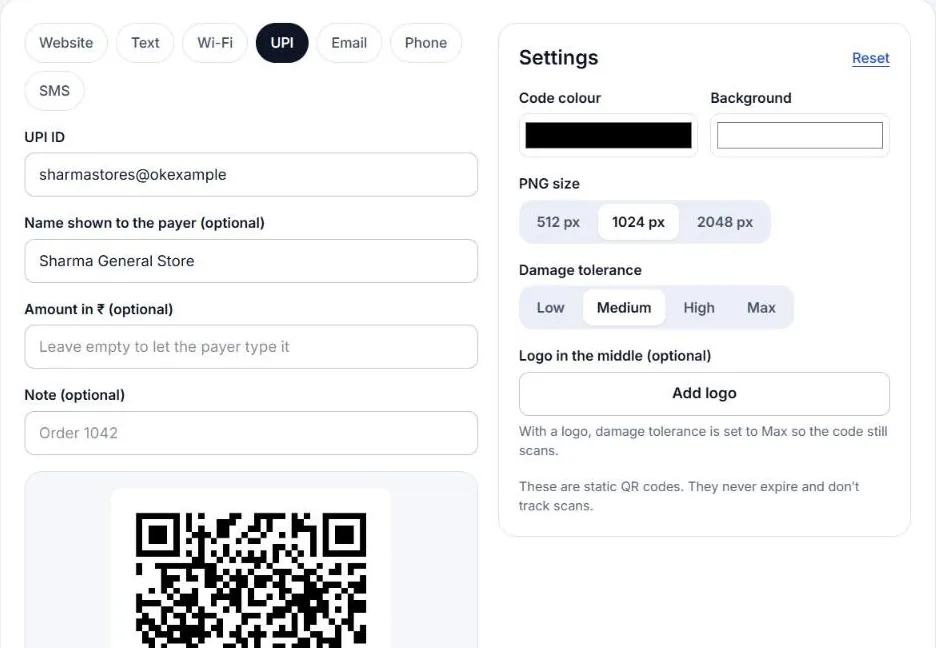
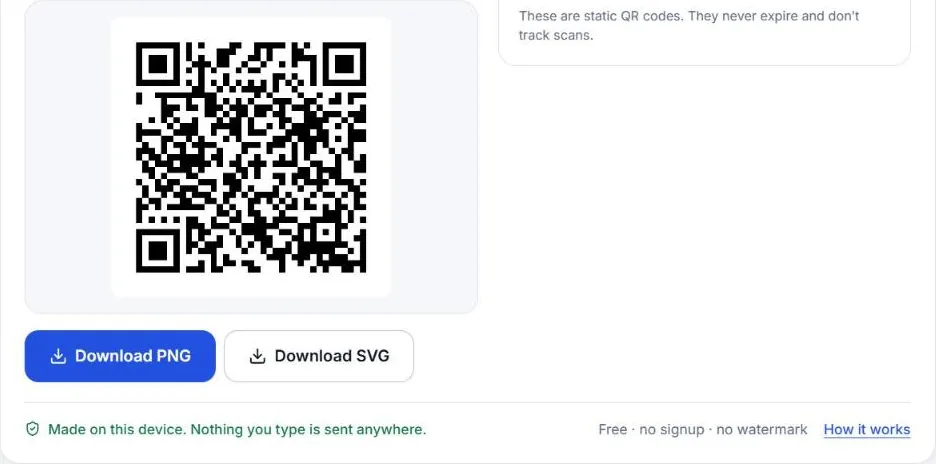
Step 3Download the PNG or SVG, test it by paying ₹1 from another phone, then print it.
How a UPI QR code works
A UPI QR code is just your UPI ID written as a pattern. When a customer scans it, their UPI app reads the ID (and the name or amount, if you added them) and opens the payment screen. The money goes straight to your bank account through UPI. Nobody in between, including us, sees or handles the payment.
Because the details are stored inside the code, it’s static: no subscription, no expiry, and it still works if our website disappears.
What to type
| Field | What to put | Required? |
|---|---|---|
| UPI ID | Your ID, e.g. shopname@okicici | Yes |
| Name | Your shop or your name, as customers should see it | Recommended |
| Amount | A fixed price, if every payment is the same | No |
| Note | A short message such as “Table 4” or “Invoice 112” | No |
Double-check the UPI ID. One wrong letter sends money to someone else, or nowhere. Testing with a ₹1 payment before you print avoids that.
Printing it for your counter
- Size: at least 5 × 5 cm on the printout so phones scan it from arm’s length. Bigger is better for a wall.
- File: download the SVG for print shops; it stays sharp at any size. The PNG at 2048 px is fine for home printers.
- Contrast: keep a dark code on a white background. Light-on-dark or coloured codes scan badly on cheap phones.
- Add text under it: your shop name and “Scan with any UPI app”. Put the QR and text in one page with JPG to PDF if the printer wants a PDF.
- Protect it: laminate the card or put it under plastic. A torn or dirty code stops scanning.
Personal UPI ID or business account?
A QR code from your personal UPI ID works for small sales. If you take many payments a day, talk to your bank or UPI app about a merchant account: banks have their own rules for business payments on personal accounts, and merchant accounts can add features like payment sound boxes and settlement reports.
Stay safe from QR fraud
- Customers should only ever scan to pay, never to receive money. Scanning a QR never puts money into your account; if someone asks you to scan to receive, it’s a scam.
- Check your printed codes now and then. Fraudsters sometimes paste their own QR sticker over a shop’s code.
- Watch your bank SMS or app for each payment rather than trusting a customer’s screen.
Fixed amount or open amount?
- No amount: the customer types the amount. Best for a shop counter where every bill is different.
- Fixed amount: the amount is filled in for the customer. Good for a single product, an entry fee, a tuition fee or one invoice. Make a new code when the price changes.
Not every UPI app treats a pre-filled amount the same way, so don’t rely on it as a check. Always confirm the payment in your own bank app.
Where to put your QR code
- At the billing counter, at eye level, close to where customers stand with their phones.
- On printed bills and invoices, so customers can pay later.
- On WhatsApp: send the PNG to customers who order by chat.
- On menus and delivery bags for takeaway orders.
If a payment doesn’t show up
UPI payments usually arrive within seconds. If the customer’s app shows the payment as pending, ask them to wait a few minutes and check again. If it failed but money was deducted, the customer should contact their own bank or UPI app. Hand over goods only once your bank app or SMS shows the money.
Privacy
QR code generator makes the code on your device. Your UPI ID and name are not saved or sent anywhere.
Questions
Does a UPI QR code work with every app?
Yes. UPI QR codes follow a common format, so any UPI app (Google Pay, PhonePe, Paytm, BHIM and bank apps) can scan and pay.
Does the QR code expire?
No. Your UPI ID is stored inside the code itself, so it keeps working as long as your UPI ID is active.
Can I set a fixed amount?
Yes. Type an amount and customers see it filled in. Use this for one product or a fee; leave it empty for a general counter QR.
Where do I find my UPI ID?
Open your UPI app and look in your profile or bank account settings. It looks like name@bankhandle.
QR code generator, free and private
Links, Wi-Fi, UPI, never expire. Runs in your browser; nothing is uploaded.