How to get the audio out of a video as MP3
By Convertifyy team · · 4 min read
Short answer
To extract audio from a video, open Convertifyy MP4 to MP3, add the video (MP4, MOV, WebM or M4V), pick 192 kbps and press Convert. You get an MP3 of the soundtrack that plays on any phone or car stereo. Trim the start and end if you only need part. Nothing is uploaded.
MP4 to MP3, free and private
Get the audio out of a video. Runs in your browser; nothing is uploaded.
Step by step
Step 1Open MP4 to MP3 and add your video file from your phone or computer.
Step 2Choose the bitrate: 192 kbps for music, 128 kbps for speech. Trim the start and end if you only need part.
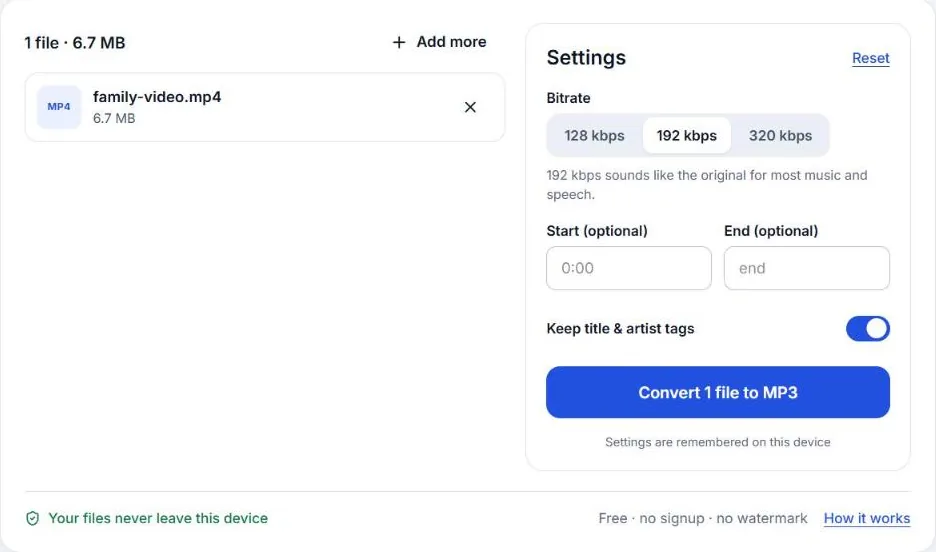
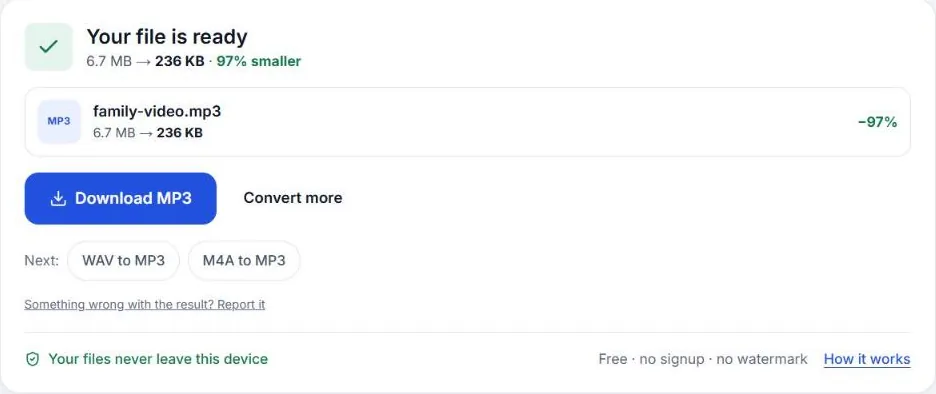
Step 3Press Convert and download the MP3.
When you only need the sound
Plenty of videos are really about the audio: a recorded lecture, a speech, a song from a function, an interview, a voice message someone sent as a video. Keeping only the sound:
- saves space: a 10-minute video can be 300 MB; the MP3 is about 14 MB at 192 kbps;
- plays anywhere: phones, laptops, car stereos and Bluetooth speakers all play MP3;
- lets you listen with the screen off, like a podcast.
Picking the right bitrate
| Bitrate | Use for | Size per minute (approx.) |
|---|---|---|
| 128 kbps | Lectures, podcasts, voice notes | ~1 MB |
| 192 kbps | Most music and general use | ~1.4 MB |
| 320 kbps | Music you care about | ~2.4 MB |
A higher bitrate can’t add quality that isn’t in the video. If the video’s own sound is low quality (an old phone recording), 128 kbps loses nothing.
Trimming
Most videos have silence or chatter at the start and end. Set Trim to keep only the part you want, for example a two-minute speech from a 40-minute recording. Trimming before converting keeps the file small and saves editing later.
Different starting files
- iPhone videos (MOV): add them directly; no need to convert to MP4 first.
- WAV recordings: use WAV to MP3 instead; it’s faster.
- Videos too big to send: if you want to keep the picture too, Video compressor shrinks the video itself. See how to make a video small enough for email or WhatsApp.
Everyday examples
- A recorded class. Trim to the lecture itself and choose 128 kbps. You get a small file you can play in any music or podcast app while travelling, at a faster speed if your app allows it.
- A song from a wedding or school function. Choose 192 or 320 kbps and use Trim to keep only the performance.
- A voice message saved as a video. 128 kbps is plenty; the MP3 is usually a few hundred KB and easy to forward.
- An interview for notes. Extract at 128 kbps and listen back while you type. An audio file is easier to pause and skip through than a video.
If something goes wrong
- The MP3 is silent. The video may have no sound track (some screen recordings and muted clips don’t). Play the video with sound first to check.
- The file won’t load. MP4 to MP3 reads MP4, MOV, WebM and M4V. If your file is in another format, the tool tells you it can’t read it.
- The sound is quiet. The MP3 keeps the loudness of the original recording. If the video was recorded from far away, turn up the volume in your player or use earphones.
- It’s slow. The audio is extracted on your own device, so a two-hour recording takes longer on an older phone. Use a computer for very long files, or trim to the part you need.
- Your browser isn’t supported. The tool uses your browser’s built-in media features. Chrome and Edge on computers and Android work best.
What about copyright?
Extracting audio from your own recordings, your lectures, or videos you have the rights to is fine. Pulling music from videos you don’t own and sharing it can break copyright, the same as copying the song itself. MP4 to MP3 only works with files on your device and doesn’t download from YouTube or other sites.
Privacy
Recordings of classes, meetings and family events are personal. MP4 to MP3 extracts the audio inside your browser, so your video is never uploaded.
Questions
Can I extract audio from a YouTube video?
No. MP4 to MP3 only works with video files you have on your device. It doesn’t download from YouTube or other websites.
Which bitrate should I choose?
192 kbps sounds like the original for most music and speech. 128 kbps is plenty for lectures and podcasts. 320 kbps is the highest MP3 quality.
Does it work on my phone?
Yes. Open MP4 to MP3 in Chrome or Safari, choose the video from your gallery and download the MP3.
Is my video uploaded?
No. The audio is extracted inside your browser, so the video never leaves your device.
How big will the MP3 be?
About 1 MB per minute at 128 kbps and about 1.4 MB per minute at 192 kbps. A 30-minute lecture at 128 kbps is roughly 29 MB.
MP4 to MP3, free and private
Get the audio out of a video. Runs in your browser; nothing is uploaded.