How to make a video small enough for email or WhatsApp
By Convertifyy team · · 4 min read
Short answer
To compress a video for email, open Convertifyy Video compressor, add the video, choose the Email preset (under 25 MB, Gmail’s limit) or the WhatsApp preset, and press Compress. Lowering the resolution to 720p shrinks it most. It runs on your device, so the video is never uploaded.
Video compressor, free and private
Fit WhatsApp, Discord or email. Runs in your browser; nothing is uploaded.
Step by step
Step 1Open Video compressor and add your video (MP4 or MOV, from your phone or computer).
Step 2Pick where you’ll send it: Email, WhatsApp or Discord. Choose 720p if the video is long.
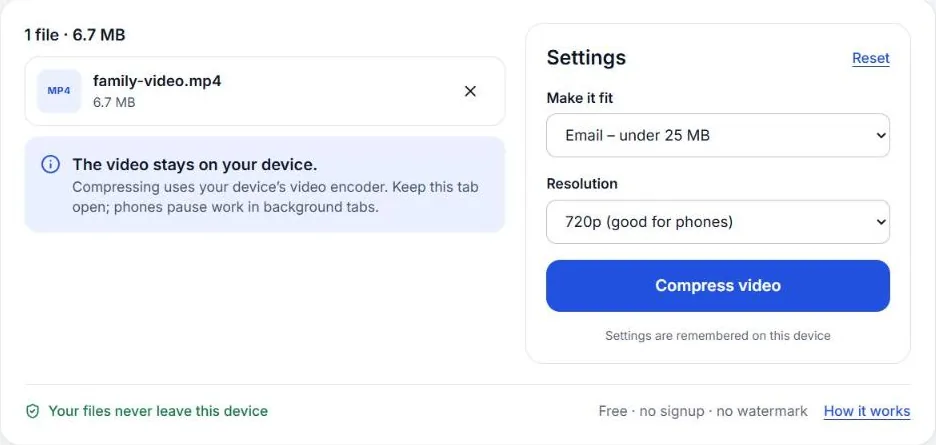
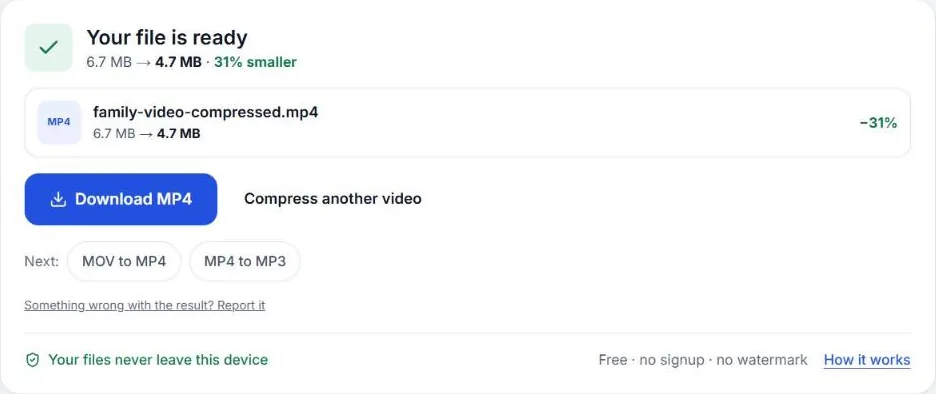
Step 3Press Compress, check the new size, and download the MP4.
Why phone videos are so big
A minute of 1080p or 4K video from a modern phone is often 100–400 MB. Phones record at a high bitrate so the video looks good on a big screen. For sending, that’s far more than needed: a video watched on another phone looks almost the same at a fraction of the size.
The limits you’re aiming for
| Where you send it | Limit |
|---|---|
| Gmail attachment | 25 MB in total (Gmail Help) |
| WhatsApp video | 100 MB at 720p on a fast connection, 64 MB at 480p on a slow one (WhatsApp Help) |
| WhatsApp document | Up to 2 GB, sent without WhatsApp’s own compression |
If the video is over the email limit, Gmail swaps the attachment for a Google Drive link. That works, but the person needs to open Drive. Compressing keeps it a normal attachment.
The two settings that matter
- Resolution. Going from 1080p to 720p cuts the file by roughly half with little visible change on phones. For 4K videos, the saving is much bigger.
- Quality. The presets pick this for you. If you use Custom quality, values between 50 and 70 are a good balance; faces and text start to blur below about 40.
Length matters too: a 10-minute video can’t fit in 25 MB and still look good. Trim it, or send a link instead.
Which preset to pick
| Preset | Target size | Good for |
|---|---|---|
| Under 25 MB | Gmail, Outlook and most work email | |
| Under 64 MB | Sending as a normal WhatsApp video, even on a slow connection | |
| Discord | Under 10 MB | Discord and other apps with small upload limits |
| Custom quality | You choose | When keeping detail matters more than an exact size |
The size presets work out the quality from the length of your video. If you leave the resolution on Keep and the video is long, the tool lowers it to 720p or 480p by itself, so the result looks soft rather than blocky.
If it’s still too big
A video can only shrink so far before it looks bad. If the tool says your video is too long to fit:
- Trim it. Cut the start and end in your phone’s Photos or Gallery app, then compress again.
- Split it into parts. Two 3-minute clips each fit where one 6-minute clip doesn’t.
- Choose 480p. It’s the smallest setting and still fine for talking-head videos and screen recordings watched on a phone.
- Send a link instead. For long recordings, upload to Google Drive or OneDrive and share the link; the other person gets full quality.
Before you send
Play the compressed file once before you press Send. Check faces, any text on screen and the sound. If on-screen text is hard to read, go back and pick a higher resolution or a bigger preset.
iPhone videos (MOV)
iPhone videos are MOV files. Video compressor accepts them directly and saves an MP4 that plays everywhere. If you only need to change the format, not the size, MOV to MP4 is faster.
Only need the sound?
For a recorded lecture, a song or a voice message, the audio alone is tiny. MP4 to MP3 pulls the soundtrack out as an MP3; an hour of audio at 128 kbps is about 58 MB, and a five-minute clip is under 5 MB.
Browser support
Video compression uses your device’s built-in video encoder through the browser. Chrome and Edge on computers and Android are fastest. Some browsers don’t support it yet; the tool tells you if yours doesn’t.
Privacy
Family videos and work recordings are personal. Video compressor processes the video on your own device: it is never uploaded to us or anyone else.
Questions
What is the email attachment limit?
Gmail allows 25 MB of attachments for personal accounts. Larger files are turned into a Google Drive link. Outlook and other services have similar limits.
What is WhatsApp’s video size limit?
WhatsApp’s help centre says the default video limit is 100 MB at 720p on a fast connection and 64 MB at 480p on a slower one. Larger videos can be sent as a document, up to 2 GB.
Will compressing ruin the quality?
A little detail is lost, but at 720p most phone videos still look sharp on a phone screen. Shorter videos keep more quality at the same size.
Is my video uploaded?
No. Video compressor runs in your browser, so your video stays on your device.
Video compressor, free and private
Fit WhatsApp, Discord or email. Runs in your browser; nothing is uploaded.